
How to Build AI Streams with Kafka and Flink
If you want low-latency AI, the setup is simple: Kafka takes in events, Flink builds features and scores them, and sinks store the results with replay and failure handling built in.
I’d break the article down into four steps: ingest, process, score, and serve. The main point is not just moving data fast. It’s making sure events can be replayed, late data can still be handled, models can score in-stream or through a service, and outputs don’t get lost or duplicated.
Here’s the short version:
- Kafka stores event streams in topics and partitions so multiple consumers can read the same data.
- Flink uses keyed state, event time, windows, and checkpoints to compute features and score events.
- Schemas need version control and compatibility checks, or one bad producer change can break the pipeline.
- Topics should be split by layer: raw, feature, and prediction.
- Partition keys like
account_idkeep related events in order. - Exactly-once delivery depends on Flink checkpoints, Kafka transactions, and
read_committedconsumers. - DLQs and monitoring help you deal with bad records, sink failures, lag, and restart loops.
- Scoring choices come down to trade-offs: embedded models are fastest, remote services are easier to update, and Kafka request-response adds more moving parts.
A few facts stand out. The article recommends replication factor = 3, min.isr=2, and acks=all for Kafka durability. It also suggests 3–14 days of retention for raw topics, 24–72 hours for feature topics, and 30–90 days for prediction topics.
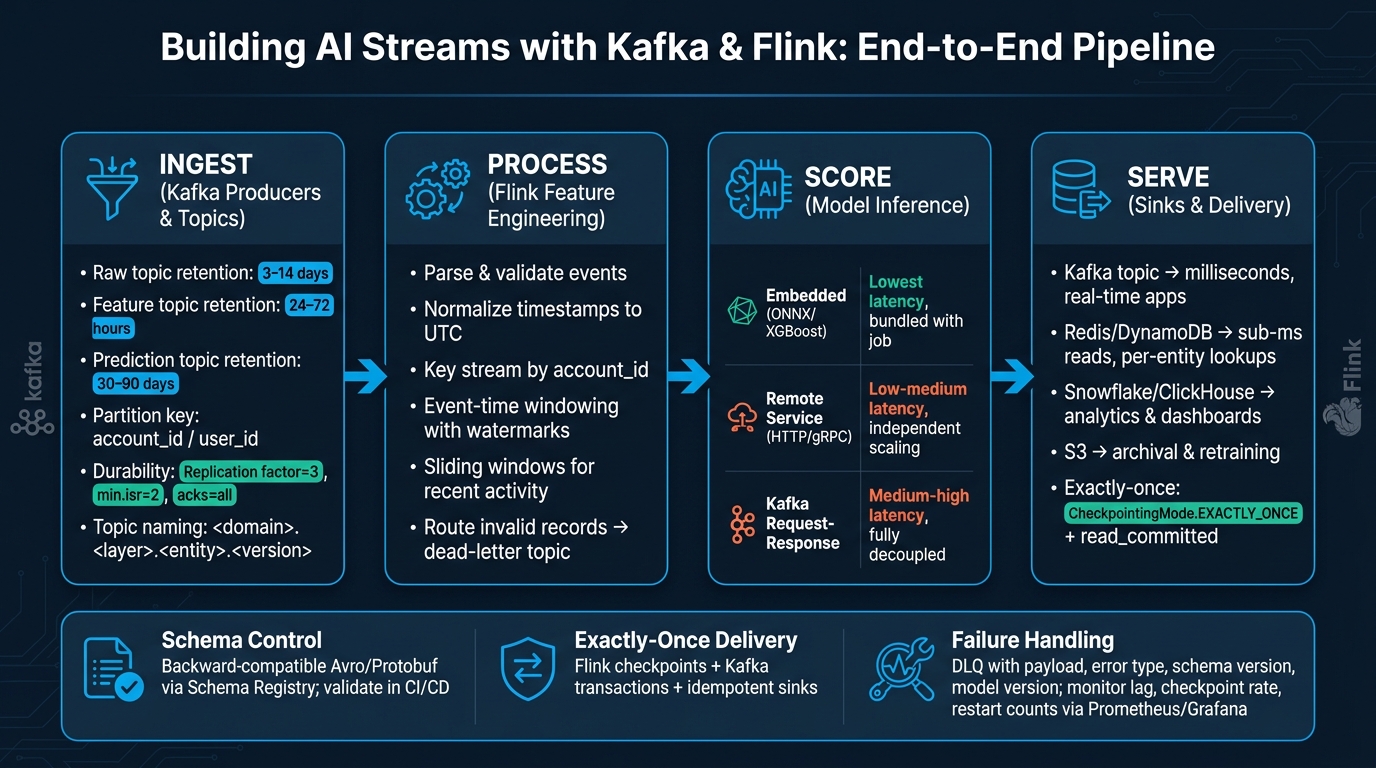
Kafka + Flink AI Streaming Pipeline: Ingest to Serve
How to Use Apache Flink and Apache Kafka to Do Real Time Stream Processing!
sbb-itb-61a6e59
Quick comparison
| Part | What it does | Main thing to get right |
|---|---|---|
| Kafka producers | Send source events | Clean keys, timestamps, and schema |
| Kafka topics | Store raw, feature, and prediction streams | Naming, retention, partitions |
| Schema Registry | Controls schema changes | Backward compatibility |
| Flink processing | Parses, validates, windows, and computes features | Event time, watermarks, keyed state |
| Model scoring | Runs inference | Pick embedded vs. remote service carefully |
| Sinks | Store predictions and metrics | Idempotency or exactly-once handling |
| DLQ + monitoring | Handles failures and tracks health | Error context, lag, checkpoints, restarts |
My takeaway: this article is a production checklist in plain form. It says you should start small, keep schemas tight, match partitions to parallelism, test broker and sink failures, and make replay part of the design from day one.
Design Kafka Producers, Topics, and Schemas
Poor producer design can break everything downstream. If messages arrive without timestamps, with messy keys, or with payloads no one checked, those mistakes spread through the whole pipeline. This layer sets the tone for everything that follows.
Create Event Producers for Streaming Inputs
Each Kafka message should carry the fields Flink needs so it can process the event on its own. A compact schema works best here, with transaction_id, account_id, amount_usd, currency, event_ts, ingest_ts, event_type, plus a small set of source fields:
{
  "type": "record",
  "name": "PaymentAuthEvent",
  "namespace": "com.example.fraud",
  "fields": [
    {"name": "transaction_id", "type": "string"},
    {"name": "account_id", "type": "string"},
    {"name": "event_type", "type": "string"},
    {"name": "amount_usd", "type": "double"},
    {"name": "currency", "type": "string"},
    {"name": "merchant_id", "type": "string"},
    {"name": "channel", "type": {"type": "enum", "name": "Channel", "symbols": ["WEB", "MOBILE", "POS"]}},
    {"name": "event_ts", "type": "long"},
    {"name": "ingest_ts", "type": "long"},
    {"name": "is_retry", "type": "boolean", "default": false},
    {"name": "ab_test_group", "type": ["null", "string"], "default": null}
  ]
}
Using amount_usd as a standard field, instead of a generic amount plus a separate currency interpretation step, keeps feature logic cleaner. It cuts down on conditional logic and makes downstream calculations less error-prone.
Once the event shape is set, map those records into raw, feature, and prediction topics.
Set Up Raw, Feature, and Prediction Topics
A simple way to keep the system organized is to split topics into three layers:
| Layer | Example topic name | Retention | Notes |
|---|---|---|---|
| Raw | payments.raw.auth_events.v1 |
3–14 days | Unmodified producer output |
| Feature | payments.feature.account_features.v1 |
24–72 hours | Flink-computed enriched events |
| Prediction | payments.prediction.fraud_scores.v1 |
30–90 days | Model outputs; retention tied to investigations and model performance analysis |
Raw topics keep source data replayable. Feature and prediction topics should keep only what downstream systems need. That keeps storage use in check and avoids turning every topic into a long-term archive.
The naming pattern <domain>.<layer>.<entity>.<version> makes the purpose of each topic easy to read and easier to govern. At a glance, you can tell what belongs where.
Partition keys matter too. Key by account_id or user_id so related events stay in order within a partition. Then size partitions with enough room for parallel processing and hot-key pressure. For durability settings, use replication factor 3, min.isr=2, and acks=all.
After the topic layout is in place, the next job is making sure schema changes don't break producers or consumers.
Control Schemas with Versioning and Compatibility Checks
Topic names and partitioning define the path data takes. Schema rules make sure that path doesn't crack under change.
Confluent Schema Registry stores schemas and enforces versions in one place. It builds subject names from the topic as <topic>-key and <topic>-value. Compatibility is enforced per subject, which keeps schema changes scoped to each topic. Backward compatibility is the safest default: new consumers can read older messages, and producers can add optional fields without breaking existing Flink jobs.
| Format | Validation strength | Payload size | Evolution flexibility |
|---|---|---|---|
| JSON | Lower unless paired with a schema validator | Larger | High readability, weaker built-in enforcement |
| Avro | Strong with Schema Registry | Smaller | Good, especially for backward-compatible evolution |
| Protobuf | Strong with Schema Registry | Smaller | Good, but schema design must be careful |
JSON is fine for early prototyping. But once schemas settle down and event volume starts climbing, Avro or Protobuf usually makes more sense. They give you tighter checks and smaller payloads.
Validate schema changes in CI/CD before rolling out any producer update. And if a record is malformed, route it to a dead-letter topic before it gets anywhere near the feature pipeline.
Build the Flink Job for Features and Model Scoring
With producers, topics, and schemas in place, Flink can turn raw events into scores. The flow is simple: consume, parse, build features, score, then emit results.
Connect Kafka Sources and Parse Event Streams
Start by setting up the Kafka source with the topic, bootstrap servers, consumer group, offset reset policy, and schema format. Checkpoints help keep source offsets safe across restarts, so the job can pick up where it left off.
Before feature logic kicks in, the parsing layer should deserialize each record into a typed record. It also needs to validate required fields like account_id and event_ts, then check whether timestamps fall within a reasonable range. If an event fails parsing or validation, send it to a dead-letter-events topic along with the original topic, partition, offset, and parse error. Normalize event timestamps to UTC before windowing.
Use the same account_id or user_id key you set up in Kafka. That keeps state local, which matters a lot once the job starts tracking per-entity activity.
After events are typed and checked, key them by entity and move into online feature computation.
Compute Online Features with State and Windows
Once records are valid, keyed state and time windows do most of the work. Key the stream by account_id - or user_id, device_id, depending on the use case - so all events for the same entity land on the same Flink task. That keeps per-entity counts, averages, session activity, and event frequency correct.
One rule here matters more than it may seem: use the same aggregation logic in training and streaming. If those paths drift apart, feature skew can sneak in and hurt scoring quality.
Use event time with watermarks and allowed lateness. Processing time tells you when Flink received the event, not when the event actually happened. And in streaming systems, events rarely arrive in perfect order. Event-time windows with watermarks give you steady results even when records show up late or out of sequence.
A common setup looks like this:
- Use a sliding window for recent activity
- Allow some lateness for delayed records
- Send very late events to a side output for separate handling
Those features then flow straight into model scoring.
Run Model Inference Inside Flink or Through a Model Service
You can score features in three main ways. The best pick depends on your latency target, how often the model changes, and how much job-management overhead your team is willing to take on.
| Pattern | Latency | Scaling | Deployment complexity | Update strategy |
|---|---|---|---|---|
| Embedded model (ONNX, XGBoost) | Lowest | Scales with Flink job | Model artifact bundled with job | Requires job redeploy on model change |
| Remote model service (HTTP/gRPC) | Low–medium | Model scales independently | Moderate; needs retries and timeouts | Deploy new model version without touching Flink |
| Request–response over Kafka | Medium–high | Decoupled; absorbs spikes | Highest; needs correlation IDs and response topics | Flexible, but adds coordination overhead |
This is where feature streams turn into prediction streams.
Embedded inference keeps the model in the same JVM process as the stream logic, so you avoid network round trips. That usually gives you the lowest latency.
A remote model service makes more sense for large models, GPU-backed models, or models that change often. In that setup, use Flink's async I/O API so endpoint calls don't block the stream. Set timeouts, and define either a fallback score or an error stream. Otherwise, one slow model service can gum up the whole job.
The request–response over Kafka pattern can work when you need strict decoupling or when many upstream systems share the same scoring layer. But there’s no free lunch here. You get separation, yet you also take on correlation IDs, response topics, and extra end-to-end latency.
After scoring, route predictions and metrics into sinks that keep delivery guarantees intact.
Configure Sinks, Exactly-Once Delivery, and Failure Handling
Once predictions leave the scoring layer, they need to land in the right place without disappearing and without showing up twice. That’s where sink choice, checkpoint setup, and failure planning come in.
Write Predictions and Metrics to the Right Sinks
Send outputs based on how people or systems will use them. Kafka works well for downstream streaming jobs. Redis or DynamoDB fit point lookups. Snowflake or ClickHouse are better for analytics. And S3 is a good home for archive data and retraining sets.
| Sink | Latency | Queryability | Best for |
|---|---|---|---|
| Kafka topic | Milliseconds | Stream consumers only | Real-time downstream apps |
| Key-value store (Redis, DynamoDB) | Sub-millisecond reads | Primary-key lookups | Per-entity score serving, keyed by the upstream entity key, such as account_id |
| OLAP database (Snowflake, ClickHouse) | Seconds to minutes | Full ad hoc analytics | Metrics, dashboards, model evaluation |
| Object storage (Amazon S3) | Batch-oriented | Requires Spark or Trino | Archival and retraining data |
Once routing is set, delivery guarantees come down to checkpoints and transactions.
Use Checkpoints, Transactions, and Replay for Exactly-Once Processing
Flink checkpoints save operator state and Kafka source offsets together. When a checkpoint finishes, Flink can commit the transaction so output records become visible to downstream consumers. If the job crashes before that checkpoint completes, Flink restores the last successful checkpoint, resets Kafka sources to the saved offsets, and drops any uncommitted transactions. That lets the stream replay cleanly instead of leaving a mess behind.
Use CheckpointingMode.EXACTLY_ONCE with the modern KafkaSink and DeliveryGuarantee.EXACTLY_ONCE. Each job should have its own transactional ID prefix so restarts don’t collide. Downstream Kafka consumers also need isolation.level=read_committed; if not, they may read aborted records. One more thing: keep checkpoint intervals below Kafka’s transaction timeout.
For non-Kafka sinks like databases or key-value stores, use idempotent writes keyed by event ID. If that’s not enough, use a two-phase commit pattern that commits only after the checkpoint succeeds.
If retries still don’t work, send bad records to a DLQ and keep an eye on pipeline health signals.
Handle Restarts, Dead-Letter Events, and Observability
In the serve stage, failure handling matters just as much as sink routing.
Use exponential backoff with a failure-rate limit. That way, a long-running issue triggers alerts instead of pushing the system into a crash loop.
Send unrecoverable scoring or sink failures to a DLQ so they can be replayed after remediation. Each DLQ record should include:
- the payload
- headers
- error type
- stage
- schema version
- model version
- timestamp
You’ll also want to track the signals that tell you whether the stream is healthy or slipping:
- consumer lag
- throughput
- checkpoint duration and success rate
- restart counts
- per-operator error rates
Export these metrics to Prometheus and Grafana so the team can step in before service levels start to slip. Those signals show whether the stream is keeping up or falling behind.
Putting the Stack Together
Once sinks, checkpoints, and DLQs are set up, the last move is to connect them into one working flow. The stack should run from producers to raw topics to Flink to scoring to sinks. When that path is wired end to end, it becomes much easier to run, inspect, and fix when something goes sideways.
Start small: one producer, one topic, one Flink job, and one sink. Get that full path working first. Then add features, windows, and scoring. That same order helps in production too. If the base path is solid, debugging stays a lot less painful.
Key Points Before Moving to Production
Before production, check five things across the pipeline. Think of this as an end-to-end production checklist, not a box-ticking exercise.
- Schema stability: Use backward-compatible schemas. Add optional fields when you need to extend the event shape, but don’t rename or delete required fields. Treat schema updates like a staged release, not a quick tweak.
- Partition-to-parallelism alignment: Watch for hot partitions and mismatched parallelism. Partition count matters, but key choice matters just as much. A bad key can overload one part of the system while the rest sits idle.
- Scoring pattern: Put small, stable models inside Flink when you want the lowest latency. For large models or models that change often, call an external model service instead. If you do that, set timeouts and circuit breakers so one slow service doesn’t drag the whole job down.
- Exactly-once configuration: Use exactly-once when duplicate records are expensive. In other cases, idempotent sinks may be the better fit.
- Failure recovery testing: Before production, push staging through Kafka broker restarts, malformed events, and sink outages. Then confirm the job comes back cleanly from checkpoints and that dead-letter handling catches malformed records.
FAQs
When should I use event time instead of processing time?
Use event time when results need to match when an event actually happened, not when the system happened to see it. This matters most for time-based work like windowed aggregations, time series analysis, and data that shows up late or out of order.
Processing time relies on the system clock, which means rerunning the same data can lead to different results. Event time keeps output tied to the event’s actual timestamp.
How do I choose between embedded and remote model scoring?
Choose based on latency needs, operational overhead, and infrastructure.
Embedded scoring runs the model inside your app as a library. That usually gives you the lowest latency and keeps infrastructure simpler.
Remote scoring sends requests to an external service. That makes model management and updates easier to handle in one place, but it also adds network latency and ties you to more operational dependencies.
What is the easiest way to replay events after a failure?
For backfills, use cold data stores like Iceberg, Delta Lake, or Hudi to restate data. That way, you don’t have to keep everything in Kafka.
For application state recovery, use checkpointing to save offsets and internal aggregations to durable storage like S3 or HDFS. Standby replicas and replicated changelog topics can help recovery happen faster.