
Lakehouse Governance for PII: Best Practices
PII in a lakehouse is only safe when tags, access rules, lineage, logs, and deletion all work together. If even one of those pieces is missing, data like SSNs, email addresses, card numbers, or health IDs can show up in notebooks, SQL tools, or dashboards where they do not belong.
Here’s the short version:
- I start by classifying PII at the column level
- I map each class to masking, blocking, or tokenization
- I enforce access in the catalog, not in ad hoc SQL
- I track column-level lineage so I know where sensitive fields move
- I log who accessed what, when, and from which tool
- I set retention and deletion rules that cover tables, exports, caches, and old file versions
- I assign clear owners across data engineering, analytics engineering, and compliance
- I test controls every month or quarter so drift does not turn into exposure
A few facts make the stakes plain: the article notes that customer PII is involved in 46% of breaches, and the average U.S. breach cost reached $9.36 million. That is why lakehouse governance cannot stop at storage permissions alone.
If I had to reduce the full guide to one checklist, it would be this:
| Area | What I focus on |
|---|---|
| Classification | Small tag model like Public, Internal, Confidential, Restricted |
| Access | RBAC for baseline access, ABAC for context like region, role, and purpose |
| Protection | Dynamic masking for contact data, tokenization or encryption for SSNs and card data |
| Visibility | Column lineage plus audit logs tied back to tagged PII fields |
| Retention | Rule-based retention windows by data type and legal basis |
| Deletion | Metadata-driven jobs that also handle downstream copies and time-travel history |
| Ownership | Named technical owner, business steward, and incident path for each PII asset |
| Testing | Negative and positive access tests, export-path checks, and deletion drills |
The main idea is simple: govern once at the platform layer, then enforce the same rule everywhere. That is the safest way to keep PII under control in a lakehouse.
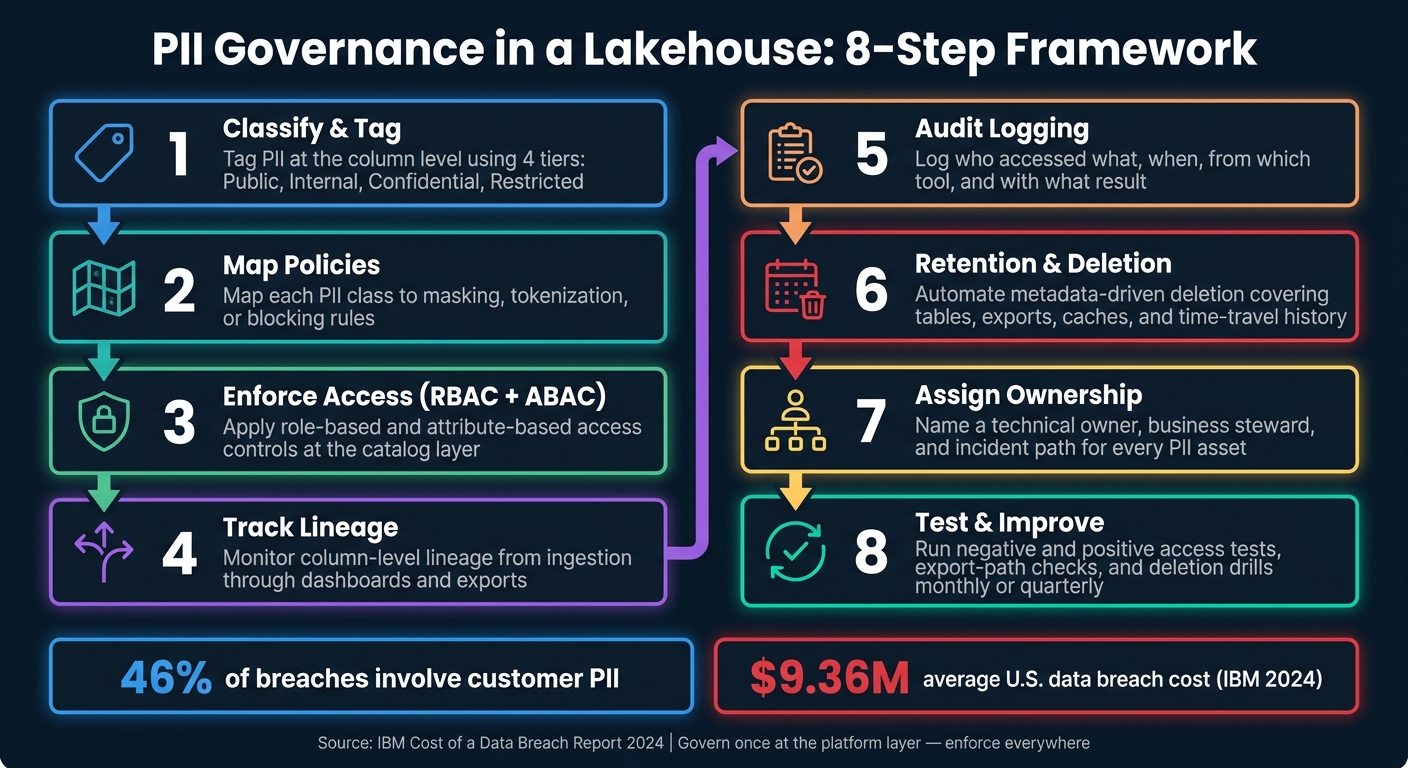
PII Governance in a Lakehouse: 8-Step Framework
What PII Governance Looks Like in a Modern Lakehouse
Core governance layers in a lakehouse
Those requirements only matter if each lakehouse layer has a clear place to enforce them.
A lakehouse does not have one magic spot where PII is locked down. It has several layers, and each layer does a different job.
At the bottom is cloud object storage - Amazon S3, Azure Data Lake Storage, or Google Cloud Storage. This is where files in Parquet or Delta format sit. IAM roles and bucket policies can limit who gets to this layer at all, but that control is too broad to protect a single column or a set of rows. Storage is best for perimeter access. The catalog is where fine-grained PII control happens.
Above storage is the catalog, which acts as the main control plane. It knows which datasets exist, who owns them, how they’re classified, and which policies apply. Schemas group related tables and make schema-level grants easier to manage. Tables store the business records, and columns are where PII fields like email_address live and get tagged. Views can expose masked or transformed data. Then there’s lineage, which shows how PII moves from ingestion through transformations into dashboards or exports, while audit logs record who accessed what and when for compliance reporting.
This is where tags, masking, lineage, and audit rules become enforceable.
Why centralized catalog and policy controls matter
When PII protection lives inside a notebook filter or a one-off SQL WHERE clause, one missing condition can expose raw data.
That happens more easily than teams like to admit. An entry-level data engineer doing a quick debug query might run SELECT * without thinking. A dashboard builder might copy a notebook and strip out the masking logic by mistake.
Centralized catalog governance fixes that by enforcing policy at the platform level, not at the query level. If a masking rule is tied to a column tag in the catalog, it applies whether the user is in a SQL editor, a Python notebook, or a BI tool. The platform applies it on its own. It also means audit logs capture access from one control point, which makes compliance evidence much easier to pull together.
Unity Catalog enforces access control, lineage, and audit across workspaces.
That’s the day-to-day difference between governance declared once and enforced everywhere, versus governance that depends on every engineer getting it right every single time.
Common platforms and their governance features
The same basic model shows up across platforms, even if the product names and screens differ. The control points stay mostly the same.
| Platform | Classification | Access Control | Lineage | Audit Logs |
|---|---|---|---|---|
| Databricks Unity Catalog | Auto-tags common PII types, including names, emails, and SSNs; custom tags via UI or API. | RBAC plus column masking and row filters at the catalog, schema, table, and column levels. | Table- and column-level lineage across SQL, Python, and Scala; queryable via system.lineage.column_lineage. |
system.access.audit captures data access events, permission changes, and login events. |
| Snowflake | Detects sensitive data categories, including U.S. PII. | Roles, grants, dynamic data masking, and row access policies. | Column-level lineage and access history for audits. | Access history and query logs are centralized in account usage views. |
| Cloud services (AWS Lake Formation, Microsoft Purview) | Tag-based scanners classify data in cloud storage. | Policy attachment to tags with cross-service IAM integration. | Lineage feeds the central catalog. | Unified audit logging across storage, compute, and analytics. |
The shared pattern is tag-driven policy enforcement. Instead of writing masking rules table by table, teams attach a masking policy to a tag like classification=PII. Any column with that tag then gets the right masking applied automatically. That approach works much better than managing rules one column at a time, especially when schemas change over time.
sbb-itb-61a6e59
PII Detection at Scale on the Lakehouse
1. Build a PII Data Classification and Tagging Model
With the catalog acting as the control plane, classification is the first step where rules start to bite. Before you can protect PII, you need to know exactly what you have and where it lives. That starts with a shared classification model: a simple vocabulary that tells engineers, analysts, and governance team members how sensitive a field is and what rules apply to it.
Keep the taxonomy small. Use four tiers: Public, Internal, Sensitive, and Regulated. Also separate direct identifiers from quasi-identifiers, because they need different controls. That split affects masking and access decisions later on.
Once the taxonomy is set, apply it as column-level tags in your catalog. Most lakehouse platforms support column tags that can trigger access and masking policies. Tag metadata should also support retention and deletion workflows. Whatever platform you use, the tagging model should also include regulatory_scope - for example, HIPAA, GLBA, PCI, or state_privacy - and data_owner, so every tagged column has a clearly accountable team.
Store tag definitions in version control, such as YAML, dbt metadata, or Terraform. That way, every change has a commit history, reviewer, and timestamp.
PII tags matter only when policies enforce them.
Ownership is what keeps tags current as data changes. Data stewards define the taxonomy. Data engineers apply tags at ingestion. Analytics engineers preserve those tags in derived models. Without clear ownership, tags drift as schemas and derived tables change.
It also helps to track a small set of metrics, like classification coverage and unreviewed tag changes. Those numbers give leadership a quick view of governance health and give auditors the evidence trail they need.
Use these tags to drive the access and masking policies in the next step.
2. Map PII Classes to Access and Masking Policies
Each PII tag should map to a default access rule and masking rule. The tag only does its job if the platform enforces it. That mapping then becomes the base layer for RBAC, masking, and row-level rules in the next step.
Use four tiers: PUBLIC, INTERNAL, CONFIDENTIAL, and RESTRICTED.
PUBLICuses standard RBAC.INTERNALstays unmasked, but only internal roles can view it.CONFIDENTIALshould default to dynamic masking. Analyst roles should also have row-level limits, and only named roles such ascustomer_support_tier2orfraud_investigatorshould see full values.RESTRICTEDshould use tokenization or encryption and block most analytics users from seeing the raw data.
For PCI data, show no more than the first 6 and last 4 digits.
The table below shows how each class maps to a specific control:
| PII Class | Example Fields | Default Control | Who Sees Full Values |
|---|---|---|---|
PUBLIC |
Product IDs, public URLs | No masking | Standard RBAC roles |
INTERNAL |
ZIP code, age range | Standard RBAC | Internal roles only |
CONFIDENTIAL |
Email, phone, address | Dynamic masking | fraud_investigator, customer_support_tier2 |
RESTRICTED |
SSN, PAN, bank account | Tokenization / encryption | payment_ops_admin, compliance_officer |
At query time, tag-driven masking applies these rules on its own. In Snowflake, a masking policy tied to a tag applies to every column with that tag. In Databricks Unity Catalog, column mask policies built as SQL UDFs check the column’s classification tag and the user’s role before deciding whether to show the value, mask part of it, or redact it fully.
Start from the safe side: mask or block by default. Then allow full access only for named roles. If someone needs an exception, use time-bound, purpose-limited grants instead of changing the production policy.
3. Apply Granular Access Controls with RBAC and ABAC
Classification sets the rule. RBAC and ABAC put that rule into action. Once tags mark PII risk, these controls enforce access at query time. RBAC decides who can get into a dataset, and ABAC decides which parts they can see.
RBAC works best when access follows job responsibilities. Keep the role set small, like DataEngineer_PII, AnalyticsEngineer_PII, BusinessAnalyst_LimitedPII, and Compliance_Analyst, then map users to those roles through your identity system. Each role should get baseline schema and table access. For example, a BusinessAnalyst_LimitedPII role might be able to read ZIP code and age band, but not SSNs or street addresses. RBAC handles the baseline. ABAC deals with the edge cases.
ABAC adds rules based on context. It looks at user attributes like region, department, clearance, and project assignment, along with data tags like PII class and geography. A policy might let users with clearance_level = 'high' and department = 'Compliance' view columns tagged Sensitive_PII, while everyone else gets masked or tokenized values. That’s where ABAC shines: not as a broad gate, but as the layer that handles context-driven exceptions. The same idea works at the row level too. US-West analysts, for instance, would see only rows where record_region = 'US-West'.
In practice, put ABAC in the catalog instead of stuffing it into ad hoc SQL. In Databricks Unity Catalog, row filters and column masks enforce these rules at the table level. If PII shows up across many tables, tag-driven ABAC is much easier to manage than setting rules table by table. It also gives you a stronger control point, since catalog-level policies cannot be removed, modified, or bypassed by individual table owners. Snowflake takes a similar separation-of-duties approach with custom roles like masking_admin and rap_admin, which split masking, row access, and data ownership across different hands.
Ownership needs to be clear from the start:
- Data engineers implement roles, masks, and row filters.
- Analytics engineers apply them in governed views and semantic models.
- Governance or security teams approve policy changes.
One detail can trip teams up: only one distinct row filter and one distinct column mask can resolve at runtime for a given user and table or column combination. If rules overlap, things can get messy fast. Test those overlaps with a few real user personas before rollout.
4. Track End-to-End Lineage for PII Data Flows
After classification and masking, the next step is lineage. Access controls tell you who can read PII. Lineage tells you where that PII goes.
Track it from ingestion through staging, transformations, marts, and BI outputs so you can see each downstream copy. Catalog-level lineage follows data across workspaces and systems, not just inside one pipeline. That makes lineage the link between classification and downstream enforcement.
Column-level lineage matters for PII. A table might hold only a handful of sensitive fields, but auditors and regulators need field-by-field detail. They need to know where data like email, SSN, account number, date of birth, or patient_id moved, which transformations touched it, and which downstream reports or models still expose it.
Lineage also helps teams spot PII sprawl. That means stray copies of sensitive data sitting in test environments, notebooks, and BI extracts. Once those copies come into view, teams can:
- remove duplicate datasets
- swap raw fields for masked or tokenized values
- block access to assets that don't need the data
Tie lineage to governance controls. Propagate PII tags through derived datasets, then pair lineage with audit logs to trace who read data derived from customers.ssn. Next, audit logs prove who actually accessed those downstream copies.
5. Set Up Audit Logging and Monitoring for PII Access
Once you’ve mapped lineage, the next job is simple: track who touched PII. Audit logs give you that trail. They also back up the retention controls covered in the next step.
Each PII audit record should show who did what, to which object, when, and with what result. In practice, that means logging:
- User ID
- Role at the time of access
- Action
- Object
- Classification tag
- UTC timestamp
- IP address
- Client tool
- Result
For HIPAA-covered environments, logs should also include consent or legal basis identifiers if your governance model tracks purpose of use.
Just collecting logs isn’t enough. If no one watches them, a breach can sit there for months without anyone noticing.
Put your monitoring effort on the signals that matter most. Watch for sudden jumps in PII reads by one user or role, large-result queries on highly sensitive tables, access to PII outside normal business hours, file-level access that gets around masking, and repeated permission-denied events on PII objects. And when something looks off, send high-priority alerts to the data domain owner - not only to a generic security inbox.
Audit logs need protection too. They can hold sensitive details, so treat them as restricted data. Store them in a locked-down, write-once zone, and keep access tight. Retention should line up with the rules you follow:
- HIPAA-oriented programs: six years
- PCI DSS: at least one year, with the latest 90 days immediately available
Ownership should be split cleanly. Data engineers handle log ingestion and curated audit tables. Security and compliance teams handle alert rules, review cadence, and incident response.
6. Define Retention and Deletion Workflows for PII
Keeping PII longer than needed creates compliance risk and breach risk. Regulators have fined companies for indefinite retention, and major breaches have shown what weak deletion controls can cost. A written policy helps, but it doesn't do the hard part. The workflow has to remove data everywhere it exists.
Set retention rules based on PII class, purpose, jurisdiction, and record type. Then connect each rule to the tables, views, and streams where that data sits. Classification tags can drive retention dates and deletion jobs. High-risk identifiers, such as Social Security numbers and full payment card data, should get the shortest retention windows. Contact fields tied to an active customer relationship may stay longer, but only when there's a documented business reason. When that reason ends, the data should be deleted.
Deletion should be automated with metadata-driven jobs. These jobs can read retention dates at ingestion or classification time and trigger removal when the deadline hits. In a lakehouse, that means thinking beyond one table. Deletion has to cover source tables, derived tables, exports, caches, and historical file versions as one governance issue. Delta Lake keeps time-travel history for 30 days by default, so deleted rows can still be reached unless you explicitly run VACUUM or a similar cleanup step to purge the underlying files.
Before a deletion job starts, check three things:
- Has the retention period expired?
- Is there an active legal hold on the record?
- Do downstream copies also need removal or reprocessing?
Legal holds stop deletion when records are needed for litigation or regulatory review. So the workflow needs a formal exception path, not a blanket purge.
Each deletion event should create an immutable log entry that records the affected record set, the retention rule that triggered deletion, the timestamp, the system that ran the job, and proof that the data was removed or made inaccessible, including in backups and governed downstream copies. After the job runs, verify deletion with row counts or checksums. None of this works if ownership is fuzzy.
7. Assign Governance Roles to Data Engineers and Analytics Engineers
Once you’ve set rules for classification, access, logging, and deletion, the next job is simple: give each control a named owner.
PII governance falls apart when ownership is fuzzy. That’s when unauthorized joins between PII fields, missing consent flags, and uneven masking rules can slip by unnoticed until a privacy incident or audit finding brings them to light.
The clearest split is this: data engineers own the source and platform layer; analytics engineers own the transformation and semantic layer. Data engineers handle governed data as it comes in, apply tags, and enforce platform-level controls. Analytics engineers carry those tags through models, apply row filters, and document how PII appears in downstream outputs.
That split fits how these roles already work. Metadata, security, lineage, testing, and ownership are already part of the job.
Don’t hide ownership in some dusty doc no one opens. Put it where people already work: catalog entries, model documentation, and ticketing systems. Each PII table or view should list:
- one technical owner
- one business steward
- one escalation path for incidents
A RACI matrix can help here too. It should map data engineers, analytics engineers, security engineers, and privacy officers to classification, access approvals, incident response, and deletion workflows. That gives auditors a clear trail of accountability. It also makes it plain who needs to act when an access request or deletion request lands. Just as important, these records make control testing easier and help teams spot gaps in the next step.
Governance should live inside day-to-day work, not sit off to the side like a separate project. For data engineers, that means a new pipeline shouldn’t merge until the pull request includes PII classification and access-control definitions. Reviewers should check that tags, masking policies, and lineage metadata are in place.
For analytics engineers, each new model should pass a checklist that confirms PII fields are needed, masked or removed where possible, and limited by the right row-level security.
Build these governance checks into pull requests and model reviews. Then use regular governance reviews to fix gaps before control testing starts. That way, weak spots show up early, when they’re still easier to handle.
8. Test and Improve PII Governance Controls Over Time
Governance controls drift over time. So once your controls are in place, you need to test them on a set schedule. That closes the loop on classification, access, lineage, logging, and deletion.
Start with the controls you already have for classification, masking, lineage, audit logs, and deletion. Test high-risk workflows every month and lower-risk workflows every quarter. Also run targeted tests after any schema, source, or permission change, because those changes often open up governance gaps.
Look for missed tags on downstream tables and in free-text columns where hidden PII can slip through. Compare automated detection against a human-reviewed sample set to measure false negatives. For access controls, run negative tests to make sure restricted access is blocked, and positive tests to make sure approved access still works. Don’t stop there. Test export paths too. A user who’s blocked in a notebook may still be able to copy data into another table or file.
Track every test result so you catch issues before they turn into incidents. If a test finds a gap, treat it like a governance defect with a clear fix path. Figure out whether the issue comes from metadata, policy, a pipeline, or a platform limit, then retest after the fix. Track findings by severity and recurrence. If the same issue keeps showing up, that’s a sign to run root-cause analysis instead of slapping on one-off patches.
Use metrics that show movement over time, not just a one-time snapshot. Good examples include:
- The percentage of sensitive datasets that are classified correctly
- The share of high-risk tables with masking enforced
- The average time to remediate governance findings
- The number of pipelines that pass governance checks on the first run
Review those metrics in steering meetings. Then use what you learn to update standards, runbooks, access rules, classification rules, and training materials. Each test cycle should make the next one a little tighter.
Use the tables below as the baseline for your test checklist.
Supporting Tables for Reference
Use these tables to put the classification, access, and retention rules into day-to-day practice. They give teams a quick way to check platform settings, confirm access design, and spot gaps before rollout.
Classification-to-policy mapping table
Start with the data class, then tie each class to a default control. Not all PII creates the same risk, so the baseline controls should match the data type. The table below maps common U.S. PII types to the technical controls your team should apply by default.
| PII Class | Example Columns | Blocked by default | Mask | Tokenize | Row Filter | Approved Roles |
|---|---|---|---|---|---|---|
| Direct Identifiers | ssn, driver_license_number, passport_number |
Most roles; only tightly scoped security, compliance, and service roles. | Show last 4 digits only (e.g., XXX-XX-6789) |
Vault-backed tokenization | Filter by project ID, purpose, or region via ABAC | PII_Sensitive_Admin, Compliance_Officer |
| Sensitive Financial PII | card_number, account_number, routing_number |
Most analytic roles; raw values never exposed. | Partial display only (e.g., **** **** **** 1234) |
PCI-compliant tokenization; keys stored outside the lakehouse in an HSM | Filter by business line, merchant, or region | Fraud_Investigator, Payment_Operations |
| Health-related PII | member_id, diagnosis_code, claim_id |
Broad access denied; limited datasets only | Generalized values (e.g., age bands, diagnosis groups) | Pseudonymous IDs | Minimum necessary principle; filter by plan or program | Limited clinical analytics roles with HIPAA training |
| Contact PII | email, phone_number, postal_address |
Block bulk export except approved marketing operations. | Hash or mask for modeling (e.g., hashed email for identity resolution) | Tokenize persistent identifiers | Filter on consent flag (opt_in = 'Y') and jurisdiction (CCPA-covered residents) |
Marketing_Operations, Customer_Support_Lead |
| Behavioral / Usage Data | user_id, device_id, session_id |
Deny user-level access for most BI users. | Replace device IDs with coarse segments (e.g., mobile, desktop) |
Tokenize persistent identifiers | Restrict to cohorts or segments; no individual-level events for general analytics | Data science and personalization teams under privacy controls |
| Aggregated / Anonymized Data | Cohort-level stats, segment counts | Usually not denied unless re-identification risk exists | Not required if aggregation thresholds are enforced (e.g., minimum 15–50 users per group) | Not typically required | May restrict sensitive segments (e.g., minors, protected classes) | Most business roles, as long as aggregation and differential privacy thresholds are preserved |
Implementation note: Direct Identifiers and Health-related PII should be catalog-managed. Financial PII tokens should be stored in the lakehouse, with raw values kept outside it in an HSM-backed service.
RBAC versus ABAC comparison table
Neither model wins in every case. In practice, most mature lakehouse environments use RBAC for coarse access boundaries and ABAC for fine-grained, attribute-driven enforcement on high-risk tables.
| Dimension | RBAC | ABAC |
|---|---|---|
| Model | Access based on predefined roles. | Access based on user, resource, and context attributes. |
| Strengths | Simple mental model; widely supported; easier to audit because permissions attach to roles that map to job functions | High granularity; supports dynamic controls such as jurisdiction-specific rules, consent-based filtering, and purpose limitation |
| Limitations | Role explosion when representing complex consent, regional, or project-specific scoping; hard to maintain least privilege in fast-changing orgs | Requires a more sophisticated policy engine and careful attribute design; harder to debug for non-specialists |
| Best fit | Stable, long-lived access patterns (e.g., standard BI dashboards on aggregated PII); smaller teams where roles map cleanly to responsibilities | Cross-jurisdiction U.S. scenarios (e.g., CCPA vs. non-CCPA residents); use cases where consent flags, project IDs, or sensitivity levels must be evaluated per query |
| Governance impact | Easier auditability through role matrices. | Supports finer policy expressiveness and consent-based access. |
Retention and deletion rules table
Retention rules don't stop at the main lakehouse tables. Deletion workflows also need to reach backups, replicas, and exported copies. If they don't, the record is still hanging around somewhere. For deletion job logs and audit records, use U.S. date and time format: MM/DD/YYYY HH:MM.
| Data Type | Legal Basis | Retention Period | Deletion Trigger | Deletion Method | Audit Evidence |
|---|---|---|---|---|---|
| Customer account data | Contractual necessity, fraud prevention, accounting obligations | 7 years after account closure | Account closure + expiration of legal hold | Logical deletion in operational systems; physical deletion or irreversible aggregation in lakehouse tables | Job IDs, run timestamps (e.g., 04/15/2026 02:30), compliance approvals |
| Marketing contact data | Consent (opt-in), legitimate interest, CCPA, CAN-SPAM | 2–3 years of inactivity | Explicit opt-out, do-not-contact flag, or 24 months of no activity | Move to suppression list; remove personal identifiers from active segments; retain aggregated campaign metrics only | Opt-out processing logs, suppression list updates, row counts (e.g., Deleted 12,450 records on 04/15/2026) |
| Payment card / transaction data | PCI DSS, fraud detection, chargeback support, accounting | 3–7 years for transaction-level data; raw card data not stored | Retention period expiry or legal hold release | Tokenized records purged; transaction metadata retained in aggregated form | Deletion job logs, PCI audit trail, exception approvals |
| Health-related PII | HIPAA minimum necessary, plan or program obligations | 6–7 years for regulated workflows | End of care relationship + legal hold expiry | Pseudonymous IDs removed; aggregated or de-identified records retained where permitted | HIPAA-compliant audit logs, deletion approvals, de-identification validation records |
| Behavioral / usage data | Consent, legitimate interest, product analytics policy | 90–365 days for operational systems | Retention period expiry or user deletion request | Purge raw event tables; retain only aggregated cohort statistics. | Automated job logs with row counts and timestamps, data steward sign-off |
| Audit logs themselves | Regulatory compliance, internal policy | 1–7 years depending on data class and regulation | Retention period expiry | Archive immutably; purge after verification. | Archival job records, hash verification of log integrity |
Tools, Training, and Team Readiness
After you define policy, make sure your platform and team can enforce it from start to finish. Governance only works when classification, masking, lineage, logging, and deletion work in production, not just in a doc.
What to verify in your platform before rollout
Before rollout, check that platform controls apply policy in day-to-day use. A written policy is not a control until the platform enforces it.
Start with a centralized catalog that registers every PII-bearing table, view, and schema. Make sure every PII object is registered and tagged. If a dataset is missing from the catalog, it won't be governed through the same central controls.
Then test masking and row filters across notebooks, scheduled jobs, SQL, and BI tools using multiple user personas before go-live. The goal is simple: the same masked result should appear across every access path. If one path leaks more than another, you've got a problem.
Also verify that query history, permission changes, login events, and data-access events are captured in one place. If any of these are off, you have blind spots in your compliance record.
Run a dry-run deletion job on a test cohort and confirm that it finds all tagged PII, applies the right removal or anonymization logic, and writes a timestamped audit record. This is where hidden breakpoints tend to show up. It's a lot better to catch a broken dependency in testing than during a live deletion request.
Hands-on training for governance implementation
Once the controls pass technical testing, train the people who will run them.
Platform docs can help at the start, but they usually don't prepare engineers for the judgment calls that show up in the middle of a project. That part comes from practice. Many organizations still don't have staff with practical privacy skills, and for data and analytics engineering teams, the gap often isn't awareness. It's hands-on experience with the tools they use every day.
DataExpert.io Academy offers hands-on training and capstone projects for practicing PII governance workflows in Databricks, Snowflake, and AWS. These capstone projects let engineers work through end-to-end governance execution, including:
- Classification
- Policy mapping
- Access reviews
- Lineage checks
- Audit review
- Deletion drills
That work happens before they touch production PII, which can save a lot of stress later.
With the platform checked and the team prepared, you can roll out controls with fewer surprises.
Conclusion
Once these controls are in place, governance stops being a manual scramble and starts working the same way every time. PII governance in a lakehouse only works as a layered system. When classification, policy, access, lineage, logging, retention, and ownership line up, you get a model that stands up to regulator review and still makes sense for engineers to run.
IBM's 2024 report puts the average U.S. breach at $9.36 million, with customer PII involved in 46% of breaches. A governance model that cuts that exposure isn't overhead - it's risk management.
Where to start first
Start with the highest-risk PII. Focus first on customer identity tables, payment records, and health data.
Then move through three steps:
- Classify and tag those datasets in your centralized catalog
- Map those tags to policies that define who can see what and in what form
- Enforce access centrally so the rules apply the same way across notebooks, SQL endpoints, and BI tools
That order cuts exposure early and gives you a traceable base to build on. After that, extend the model to lineage, retention, and audit automation.
How to mature the governance model over time
Build out the model in stages. In the first three to six months, extend lineage coverage so you can trace PII from raw ingestion through transformations and into downstream data products. In the six- to 12-month window, add automated retention and deletion workflows to handle CCPA/CPRA erasure requests and enforce retention limits without manual work. From 12 to 24 months, shift attention to audit readiness with centralized log dashboards, quarterly access reviews, and recurring control tests that confirm masking holds.
Data engineers put the controls into day-to-day use. Analytics engineers keep those controls intact in downstream models. The aim is simple: less exposure, less manual work, and less audit risk. Over time, governance becomes a routine control system instead of a one-time project.
FAQs
What should we govern first?
Start with user authentication and data access patterns to cut risk early. Audit your environment for red flags like unauthorized access, suspicious permission changes, and repeated failed login attempts.
Then put a strong base in place with RBAC, user and data classification, and access controls. Doing this early matters because adding it later gets much more complex and expensive.
How do RBAC and ABAC work together?
RBAC is the base layer. It assigns permissions by role, like Data Analyst or Data Engineer, which makes access management much simpler.
ABAC adds rules based on attributes, such as classification labels. Here’s the big difference: access can change based on the data itself, not just the user’s role.
For example, if a column is marked sensitive, an ABAC policy can automatically mask it for certain users, even if those users already have access through an existing role assignment.
How do we prove PII was fully deleted?
Purge the data using your lakehouse or warehouse retention policy. Then verify that the sensitive records can no longer be queried, including through recovery features where that applies.
Keep an audit trail of the purge. Log execution details such as the execution ID, target tables, purged record counts, and Query ID. Also confirm there is zero remaining access through row-count checks or record-access checks.